
CA Equity - Create a new request
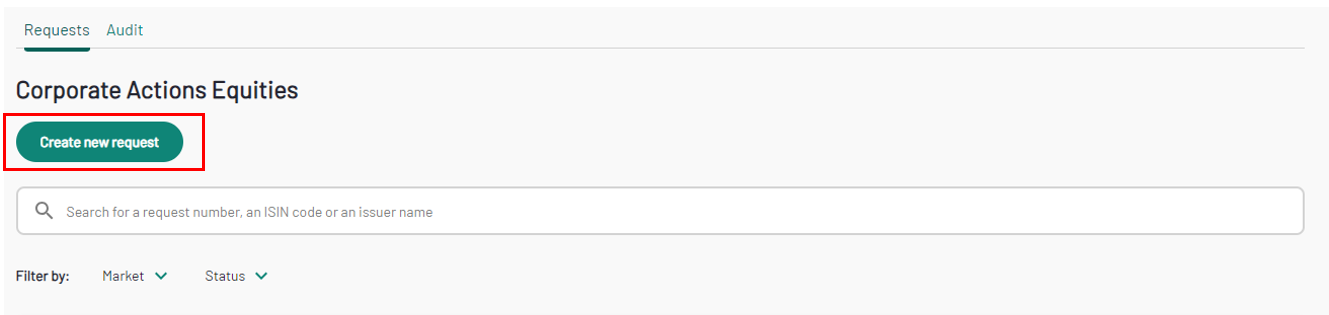
To create a new CA request project, click the “Create new request” button on the “Requests” tab.
You will have to select the Issuer name, the ISIN and the Corporate Action type.
Please note that only the Issuer names and ISINs in scope of your Company or Delegation will appear in the dropdown lists.
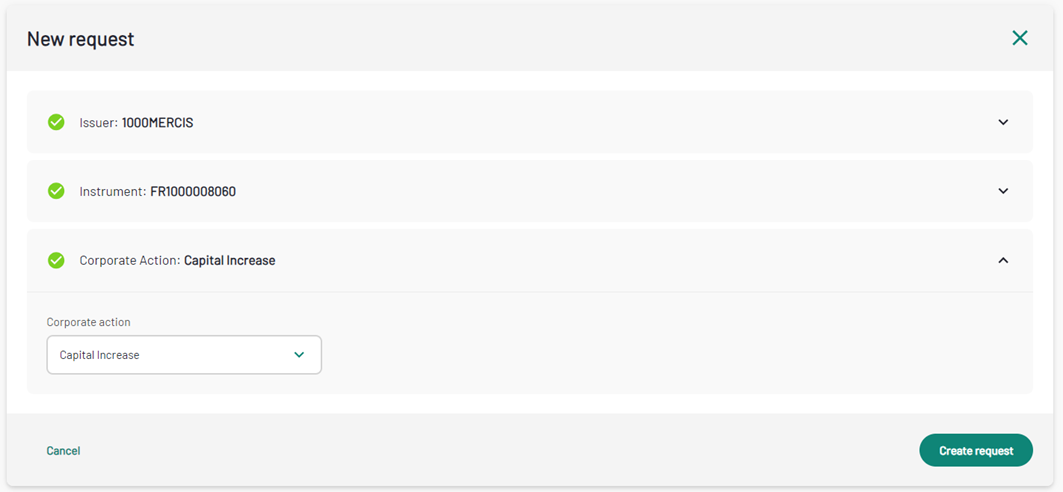
From Corporate Action dropdown list, you can select all the Corporate Action type:
- Cash Dividend
- Optional Dividend
- Capital Increase
- Capital Decrease
- Split
- Reverse-split
There is a separate form for each corporate action, at the bottom of each form, the "Save and Close" button is always available. You can click on it at any time after you have filled the main information. Upon clicking, you will be redirected to the request list screen, and your request will be marked as draft. You can come back to it at any time.
Corporate Action types and expected information
Capital Increase
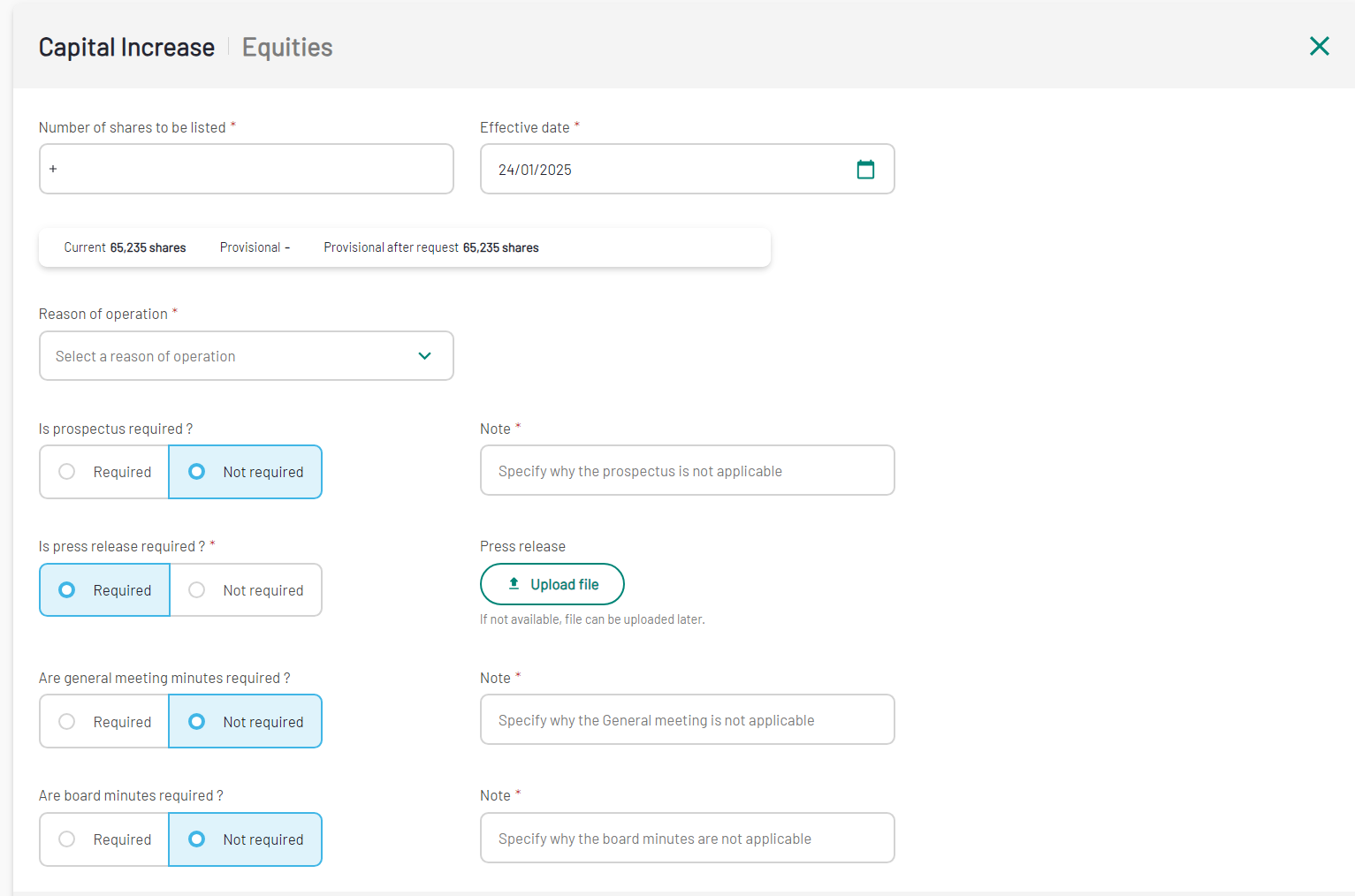
The aim of a Capital Increase operation is to define all the relevant information necessary to process a capital increase by issuing new shares. From the "Create new request" form, select Capital Increase as a Corporate Action type. This includes details such as:
| Field | Field Format | Mandatory |
|---|---|---|
| Number of shares to be listed | Number | Y |
| Effective date | Date: DD/MM/YYYY | Y |
| Reason of the operation | Dropdown list of values | Y |
| Is prospectus required? | Radio button, defaulted to "Not required" | Y |
| Note | Text | Mandatory if the prospectus is required |
| Is press release required? | Radio button, defaulted to "Not required" | Y |
| Note | Text | Mandatory if the press release is required |
| Are general meeting minutes required? | Radio button, defaulted to "Not required" | Y |
| Note | Text | Mandatory if meeting minutes are required |
| Are board minutes required? | Radio button, defaulted to "Not required" | Y |
| Note | Text | Mandatory if the press release is required |
The Effective date is set by default at trading day + 2. You can select the next trading day, but you will have to reach out to Euronext directly to make sure your request can be processed in time.
The fields Current, Provisional and Provisional after request are automatically filled out. Current represents the current number of shares outstanding, and Provisional after request refers to the number of shares to be admitted in the case of an increase.
When "Prospectus", "Press release", "Meeting minutes" or "Board minutes" are set to Required, the "Note" field becomes mandatory, and a document upload is required.
Cash Dividend
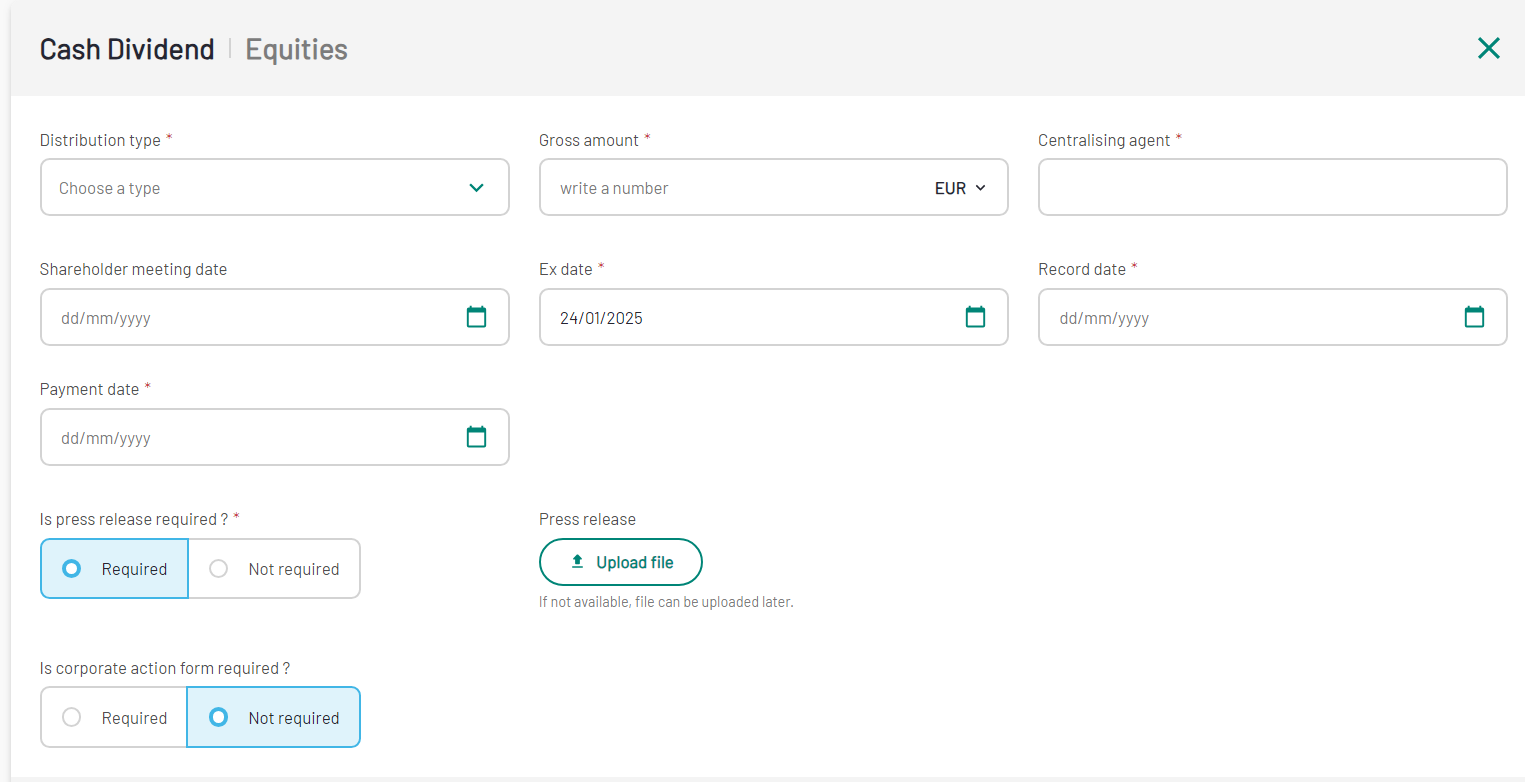
The aim of Cash Dividend operation is to define how the company will distribute a portion of its profits to the shareholders. From the "Create new request" form, select Cash dividend as a Corporate Action type. The form includes details such as:
| Field | Field Format | Mandatory |
|---|---|---|
| Distribution type | Dropdown list of values | Y |
| Gross amount | Number Currency selection is a dropdown list of values | Y |
| Centralising agent | Text | Y |
| Shareholder meeting date | Date: DD/MM/YYYY | Y |
| Ex date | Date: DD/MM/YYYY | Y |
| Record date | Date: DD/MM/YYYY | Y |
| Payment date | Date: DD/MM/YYYY | Y |
| Is press release required? | Radio button, defaulted to "Not required" | Y |
| Note | Text | Mandatory if press release are required |
| Is corporate action form required? | Radio button, defaulted to "Not required" | Y |
| Note | Text | Mandatory if corporate action form is required |
The Ex date is prefilled, set by default at trading day + 2. You can select the next trading day, but you will have to reach out to Euronext directly to make sure your request can be processed in time.
When "Press release" and "Corporate action form" are set to Required, the "Note" field becomes mandatory, and a document upload is required.
Operational Dividend
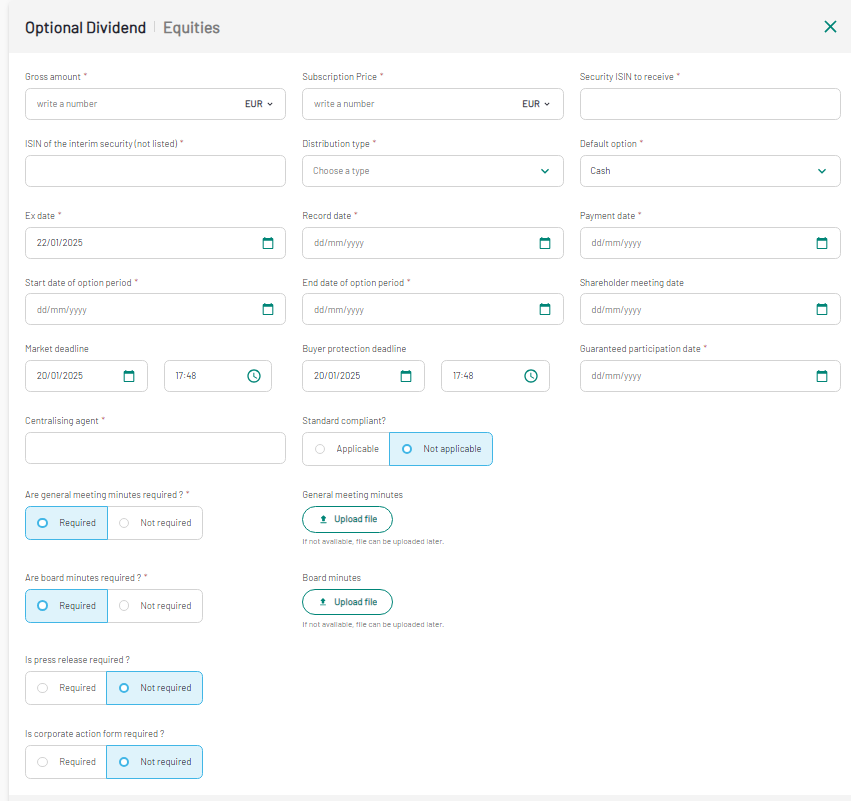
The aim of Operational Dividend operation is to define how the company will reward his shareholders based on the success of main business operations. From the "Create new request" form, select Operation Dividend as a Corporate Action type. The form includes details such as:
| Field | Field Format | Mandatory |
|---|---|---|
| Gross amount | Number Currency selection is a dropdown list of values | Y |
| Subscription Price | Number Currency selection is a dropdown list of values | Y |
| Security ISIN to receive | ISIN Code: 12 characters | Y |
| ISIN of the interim security (not listed) | ISIN Code: 12 characters | Y |
| Ex date | Date: DD/MM/YYYY | Y |
| Record date | Date: DD/MM/YYYY | Y |
| Payment date | Date: DD/MM/YYYY | Y |
| Start date of option period | Date: DD/MM/YYYY | Y |
| End date of option period | Date: DD/MM/YYYY | Y |
| Shareholder meeting date | Date: DD/MM/YYYY | N |
| Market deadline | Date: DD/MM/YYYY + Time hh:mm | N |
| Buyer protection deadline | Date: DD/MM/YYYY + Time hh:mm | N |
| Guaranteed participation date | Date: DD/MM/YYYY | Y |
| Centralising agent | Text | Y |
| Standard compliant? | Radio Button: Applicable / Not Applicable | Y |
| Are general meeting minutes required ? | Radio button, defaulted to "Not required" | Y |
| Note | Text | Mandatory if general meeting minutes are required |
| Are board minutes required ? | Radio button, defaulted to "Not required" | Y |
| Note | Text | Mandatory if board minutes are required |
| Is press release required? | Radio button, defaulted to "Not required" | Y |
| Note | Text | Mandatory if press release are required |
| Is corporate action form required? | Radio button, defaulted to "Not required" | Y |
| Note | Text | Mandatory if corporate action form is required |
The Ex-date is prefilled, set by default at trading day + 2. You can select the next trading day, but you will have to reach out to Euronext directly to make sure your request can be processed in time.
For "Market deadline" and "Buyer protection" deadline you will find date and time prefilled with the request creation date and time, both date and time can be amended.
When all the mandatory fields have been filled, you can amend the information linked to General meeting minutes, Board minutes, Press release and Corporate action form, all marked as "Not required" by default. In this case the "Note" field is always mandatory. If "Required" is selected as a value, then it will be needed to upload the linked document, by clicking on the dedicated button.
Capital Decrease
The aim of a Capital Decrease operation is to adjust the company's share capital for various strategic and financial reasons. From the "Create new request" form, select Capital Decrease as a Corporate Action type The form includes the following details:
| Field | Field Format | Mandatory |
|---|---|---|
| Number of shares to be cancelled | Text | Y |
| Effective date | Date: DD/MM/YYYY | Y |
| Reason of operation | Dropdown of possible values | Y |
| Is prospectus required? | Radio button, defaulted to "Not required" | Y |
| Note | Text | Mandatory if prospectus is required |
| Is press release required? | Radio button, defaulted to "Not required" | Y |
| Note | Text | Mandatory if press release are required |
| Are general meeting minutes required ? | Radio button, defaulted to "Not required" | Y |
| Note | Text | Mandatory if general meeting minutes are required |
| Are board minutes required ? | Radio button, defaulted to "Not required" | Y |
| Note | Text | Mandatory if board minutes are required |
When all the mandatory fields have been filled, you can amend the information linked to Prospectus, Press release, General meeting minutes, Board minutes, all marked as "Not required" by default. In this case the "Note" field is always mandatory. If "Required" is selected as a value, then it will be needed to upload the linked document, by clicking on the dedicated button.
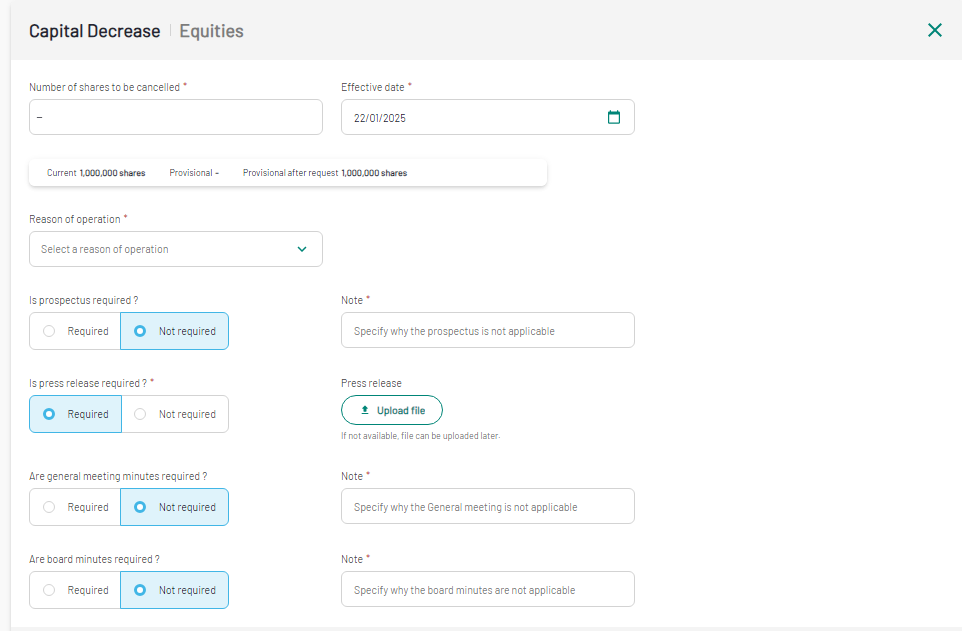
The fields Current, Provisional and Provisional after request are automatically filled out. Current represents the current number of shares outstanding, and Provisional after request refers to the number of outstanding shares after the request.
Split
The aim of a stock Split operation, is to define all the information needed to make shares more accessible to a broader range of investors and enhance the overall liquidity of the stock. From the "Create new request" form, select Split as a Corporate Action type. The form includes details such as:
| Field | Field Format | Mandatory |
|---|---|---|
| Change of ISIN code ? | Radio Button: Applicable / Not Applicable | Y |
| Number of securities to be listed | Number | Y |
| New share nominal value | Number Currency selection is a dropdown list of values | Y |
| Split parity ratio | Current: Text New: Text | Y |
| Fraction Management | Dropdown list of values | N |
| Centralising agent | Text | Y |
| Effective date | Date: DD/MM/YYYY | Y |
| Record Date | Date: DD/MM/YYYY | Y |
| Payment Date | Date: DD/MM/YYYY | Y |
| General Meeting date | Date: DD/MM/YYYY | N |
| Board of Directors Meeting date | Date: DD/MM/YYYY | N |
| BALO publication date | Date: DD/MM/YYYY | N |
| Are general meeting minutes required ? | Radio button, defaulted to "Not required" | Y |
| Note | Text | Mandatory if general meeting minutes are required |
| Are board minutes required ? | Radio button, defaulted to "Not required" | Y |
| Note | Text | Mandatory if board minutes are required |
| Is press release required? | Radio button, defaulted to "Not required" | Y |
| Note | Text | Mandatory if press release are required |
| Is corporate action form required? | Radio button, defaulted to "Not required" | Y |
| Note | Text | Mandatory if corporate action form is required |
| Is BALO Notice required? | Radio button, defaulted to "Not required" | Y |
| Note | Text | Mandatory if BALO notice is required |
When all the mandatory fields have been filled, you can amend the information linked to General meeting minutes, Board minutes, Press release, Corporate action form and BALO notice, all marked as "Not required" by default. In this case the "Note" field is always mandatory. If "Required" is selected as a value, then it will be needed to upload the linked document, by clicking on the dedicated button.
Reverse-split
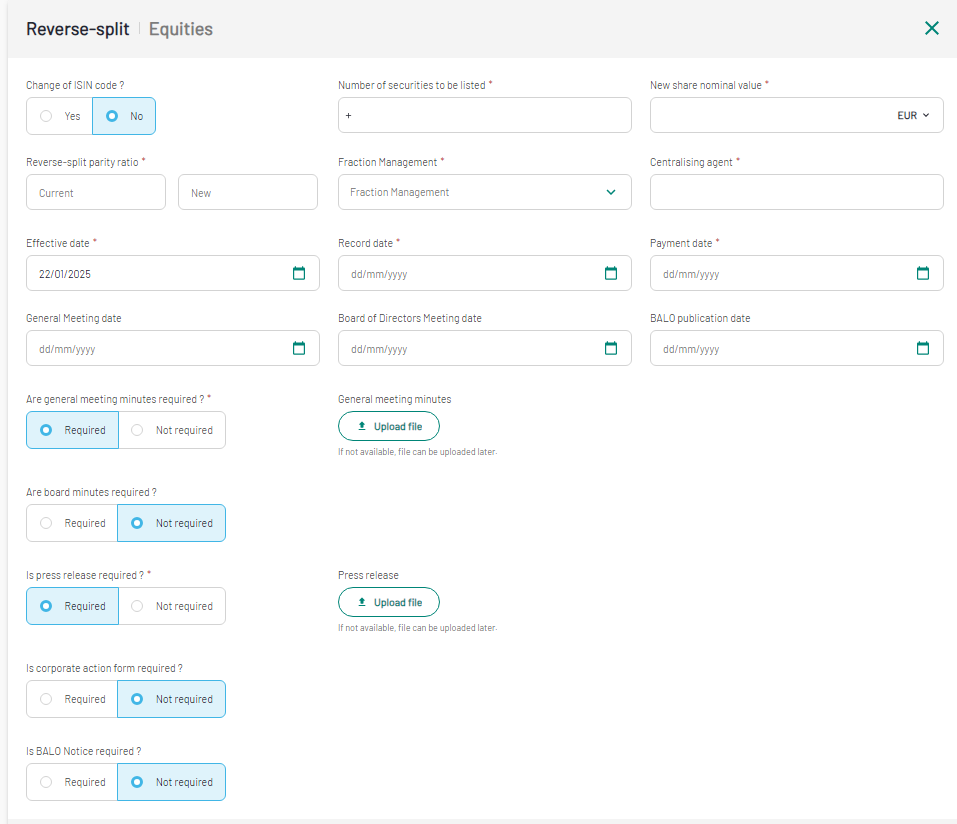
The aim of a reverse split is to consolidate shares to increase the share price, meet listing requirements, and potentially improve the company's market perception. From the "Create new request" form, select "Reverse-split" as a Corporate Action type. The form will includes the following details:
| Field | Field Format | Mandatory |
|---|---|---|
| Change of ISIN code ? | Radio Button: Applicable / Not Applicable | Y |
| Number of securities to be listed | Number | Y |
| New share nominal value | Number Currency selection is a dropdown list of values | Y |
| Reverse-split parity ratio | Current: Text New: Text | Y |
| Fraction Management | Dropdown list of values | N |
| Centralising agent | Text | Y |
| Effective date | Date: DD/MM/YYYY | Y |
| Record Date | Date: DD/MM/YYYY | Y |
| Payment Date | Date: DD/MM/YYYY | Y |
| General Meeting date | Date: DD/MM/YYYY | N |
| Board of Directors Meeting date | Date: DD/MM/YYYY | N |
| BALO publication date | Date: DD/MM/YYYY | N |
| Are general meeting minutes required ? | Radio button, defaulted to "Not required" | Y |
| Note | Text | Mandatory if general meeting minutes are required |
| Are board minutes required ? | Radio button, defaulted to "Not required" | Y |
| Note | Text | Mandatory if board minutes are required |
| Is press release required? | Radio button, defaulted to "Not required" | Y |
| Note | Text | Mandatory if press release are required |
| Is corporate action form required? | Radio button, defaulted to "Not required" | Y |
| Note | Text | Mandatory if corporate action form is required |
| Is BALO Notice required? | Radio button, defaulted to "Not required" | Y |
| Note | Text | Mandatory if BALO notice is required |
When all the mandatory fields have been filled, you can amend the information linked to General meeting minutes, Board minutes, Press release, Corporate action form and BALO notice, all marked as "Not required" by default. In this case the "Note" field is always mandatory. If "Required" is selected as a value, then it will be needed to upload the linked document, by clicking on the dedicated button.
Additional Information across all the Corporate Action types
During the creation you can also activate some additional features, like Other comments, Publication timing, Notice review, Comments acting on the dedicated toggle.
Other Documents
Enabling the Other documents section you can share one or more documents linked to your request. Click on "Add documents" to see a new row reporting: Title and Upload file button. Click on the button to select the document you want to upload. You can even delete the document by clicking on the dustbin.

Publication timing
A market notice is disseminated at least two business days prior to the effective date of the request, by default. Enabling the toggle, you will be able to select when to publish the notice: After market closing, Before market closing, During market session and you can even define the dissemination date.

Notice review
If you want your working group to be able to review the market notice, you can enable the feature by clicking on the dedicated toggle. Please note that your "Working group" is displayed by clicking on "Show", in the dedicated menu.
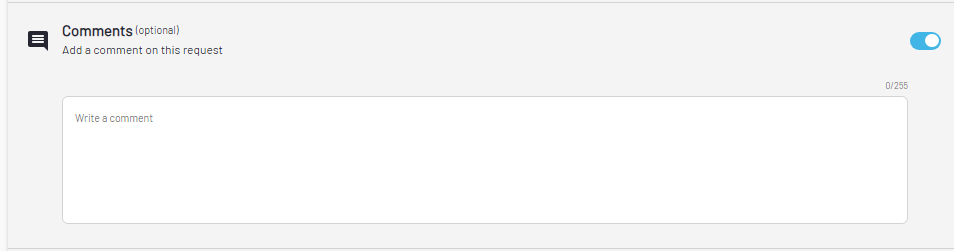
Comment
A comment box is always available at the bottom of the request creation page. Enabling the toggle a text box will appear and you can type you message with a max length of 255 digits.
When all the information is completed, you can click on "Create" to move to the Operation details page, where an overview of the inserted information is available, and you can upload additional documents if needed. The Request status will turn into "Internal Validation".